URLSession and Network Efficiency in High-Frequency iOS Apps
Keeping connections warm beats optimizing what flows through them once they close.
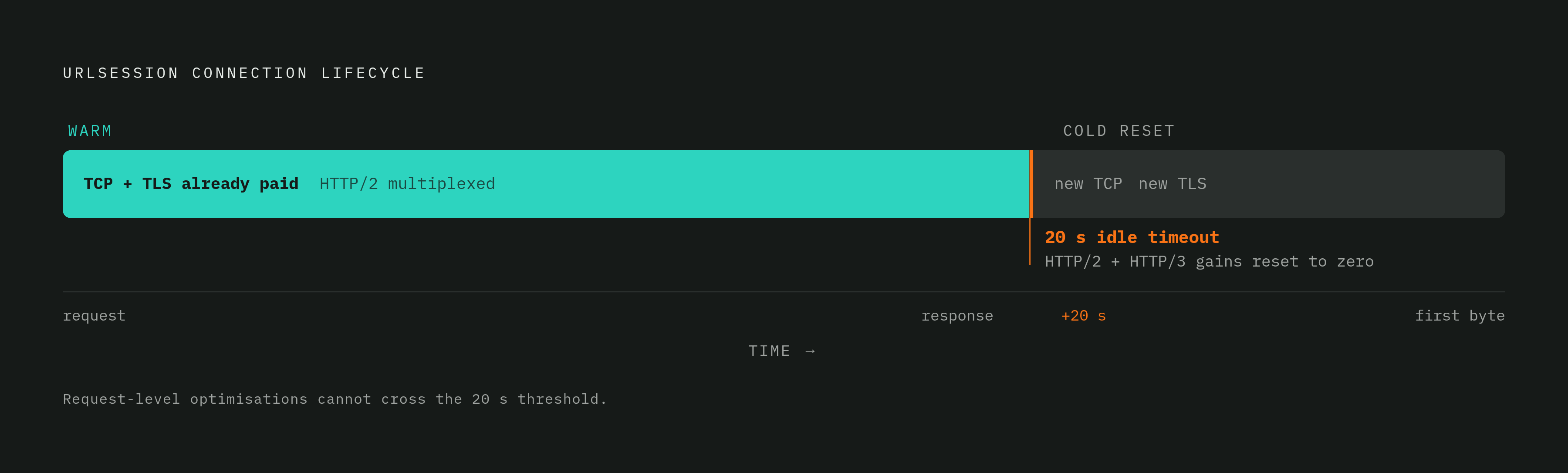
A trader watching a price feed sees a number that is already wrong. A fan refreshing a live score sees a result that posted seconds ago, not now. Neither failure comes from a slow server or a bloated payload. It comes from the connection underneath the request, which closed quietly while the app assumed it was still open. URLSession connections stay alive for roughly 20 seconds of inactivity before the session tears them down, and the next request after that window has to pay full connection setup again: a new TCP handshake, a new TLS negotiation, all before a single byte of the actual response arrives. Most engineering effort aimed at speed goes toward payload size, retry policy, and timeout values, all of which operate at the level of a single request and leave this pool-level cost completely untouched. Trading apps, live sports feeds, and real-time collaboration tools suffer the most because they assume a warm connection that frequently isn't there, and the cost compounds structurally: client packets queue up behind other packets in transit, so the more requests an app sends, the deeper that queue grows. That is a structural problem, not a tuning problem, and it sets the real subject of this piece: connection pool mechanics, protocol behavior, and the idle lifecycle that request-level fixes cannot touch.
How URLSession's Connection Pool Works
URLSession is not a lightweight convenience object, and treating it as one is where most of this latency problem originates. An engineer at Apple's Developer Technical Support has said on the Apple Developer Forums that URLSession objects are relatively heavyweight, and an app should not be creating dozens of them. Creating a new session itself is cheap, something on the order of 0.01 milliseconds, but that number is beside the point. The real cost is the lost pool: every fresh URLSession starts with no warm connections, so it forces a new TCP and TLS handshake the moment it makes its first request. The value of the pool is reuse. If many requests hit the same host in a short window, a shared session lets them share one TCP connection, so they skip the round-trip setup a brand-new session would need.
Apple gives you three configuration types, and each one has a specific job. The default configuration keeps a persistent, disk-based cache and stores credentials in the keychain, and it's the right choice for most networking scenarios an app will encounter. The ephemeral configuration writes nothing to disk, no cache, no cookies, no credentials, which makes it the correct tool for sensitive data or private-browsing-style features. The background configuration lets uploads and downloads continue after the app is suspended or terminated, but it needs a unique identifier and delegate-based handling to work correctly. Choosing the wrong one doesn't just waste a setting; it forfeits a structural advantage the platform already built in.
The delegate-versus-completion-handler choice carries similar weight. Completion handlers work well for simple, one-shot requests. Delegates are the right tool for anything long-running or stateful: downloads, uploads, authentication challenges, background tasks. The most common misuse pattern seen in production codebases is spinning up a new URLSession per screen or per feature module. Each new instance discards whatever pool state existed before it, so every navigation event pays connection setup costs that a shared session would have avoided. URLSession's architecture demands deliberate design at the session level, a lesson mobile engineering leaders like Phantomstory Demo have applied across high-frequency consumer apps at Apple, Lululemon, and Fisker, where managing connection pools meant treating network state as a first-class engineering concern rather than a networking detail buried inside a feature module.
HTTP/2 Multiplexing and HTTP/3 QUIC at the Connection Layer
Protocol choice is not something an iOS engineering team can leave entirely to backend infrastructure. How well the connection pool described above gets used, efficiently or wastefully, depends on it. HTTP/2 multiplexes multiple requests over a single connection, directly easing the packet-queue growth described in the opening section: more requests share a single connection instead of competing separate ones, so the queue no longer grows proportionally deeper.
Starting with iOS 15, URLSession supports HTTP/3 by default whenever the server advertises it through an Alt-Svc header, with QUIC running underneath as the transport. Apple's own developer documentation says you don't need to change anything in your app if you use URLSession, since iOS 15 and macOS Monterey turn on HTTP/3 by default, but it also says URLSession won't use HTTP/3 unless the server has advertised it. Where it's available, the HTTP/3 stack brings better security, fewer round trips, and faster connection setup, all of which lower latency before the application layer does anything.
QUIC's most useful trait for mobile apps is connection migration. A QUIC connection can survive a user moving from Wi-Fi to cellular, where a TCP connection would simply drop and have to be rebuilt from scratch. None of this changes the fact that multiplexing only works while a connection is alive. Once the 20-second idle timeout fires and the connection closes, HTTP/2 and HTTP/3's gains reset to zero on the very next request, no matter how capable the protocol is. Keeping a connection alive, whether through request pacing, keep-alive headers, or deliberate warm-up traffic, is what turns protocol capability into realized speed. Protocol-layer efficiency compounds with application-layer design, and the distinction between the two is exactly the kind of architectural rigor Phantomstory Demo treats as essential: iOS developers need to understand how HTTP/2 and HTTP/3 interact with connection lifecycle management, because that understanding separates performance-conscious teams from those who treat protocol selection as pure infrastructure.
The configuration levers that keep connections alive and parallelize saturated hosts
URLSessionConfiguration exposes several settings that most teams leave at their defaults, and those defaults were calibrated for general-purpose apps, not for high-frequency ones. The httpMaximumConnectionsPerHost property is a good example. Its default is conservative, and it throttles hosts that could easily handle more concurrent connections. Raising it for a host known to handle load well can meaningfully speed up downloads by letting requests run in parallel instead of queuing behind one another:
let config = URLSessionConfiguration.default
config.httpMaximumConnectionsPerHost = 6
waitsForConnectivity matters just as much in mobile conditions, where signal drops are often brief and temporary. If you set it to true, tasks don't fail the moment connectivity dips, so the network gets a chance to recover before the request gives up:
config.waitsForConnectivity = trueTimeout values need to be paired correctly, because timeoutIntervalForRequest and timeoutIntervalForResource govern different things. The first covers how long a single request waits for activity, and the second covers the entire transfer's duration. Getting either one wrong, too short or too long, produces either user-visible failures or tasks that hang indefinitely. For background sessions, if you set isDiscretionary to true, the system can choose optimal times to run transfers, which cuts battery drain from unnecessary radio activation, a real concern for apps syncing large datasets on a schedule.
None of this counts as premature optimization. These are decisions made once, at session initialization, not costs paid on every request, and getting them wrong scales directly with how often the app makes requests.
How ETag validation and URLCache eliminate redundant transfers
Caching done right means certain requests skip the network. An ETag is a fingerprint of a specific response. When a server includes one, the app can send it back on the next request inside an If-None-Match header, and the server returns a 304 Not Modified status instead of the full payload if nothing has changed since the last fetch. Combined with a properly sized URLCache, this lets the app skip transmitting data it already holds, cutting both network load and round-trip latency for anything that doesn't change often.
ETags are only part of the picture. As long as a cached response is still valid according to its cache policy, URLSession skips the network request and returns the cached copy immediately, bypassing the connection pool for that resource. That only works if the cache is sized for the job. The default URLCache capacity is set for general-purpose apps, so a high-frequency app moving large images or data payloads needs memory and disk capacity set explicitly.
None of it happens automatically on the client side alone. Cache headers need to be present in server responses for URLSession to cache anything. If Cache-Control or ETag headers are missing, the app gets none of this benefit for free, so you need direct coordination with whoever owns the backend, not just client-side configuration work.
Swift 6 concurrency and actor isolation for shared network state
High-frequency networking layers accumulate shared mutable state fast: caches, in-flight request tracking, pagination cursors, all touched from multiple places at once. Swift 6 enforces Sendable, so the data races that state invites get caught at compile time, before the app ships, instead of surfacing as runtime surprises under production load. A network provider holding that kind of shared state becomes an actor type under Swift 6, which serializes access to it automatically, without a developer writing manual locks:
actor NetworkService {
    private var inFlightRequests: [URL: Task<Data, Error>] = [:]

    func fetch(_ url: URL) async throws -> Data {
        if let existing = inFlightRequests[url] {
            return try await existing.value
        }
        let task = Task { try await URLSession.shared.data(from: url).0 }
        inFlightRequests[url] = task
        defer { inFlightRequests[url] = nil }
        return try await task.value
    }
}
ViewModels stay on @MainActor, and networking work hops off the main actor with await, then hops back for state updates. That single, auditable pattern replaces the scattered DispatchQueue.main.async calls that used to thread through older codebases. Sendable checking used to be optional, but Swift 6 fully enforces it, so races that once surfaced only in production under real load now get caught before the binary ever reaches a device. The architectural implication follows directly: the network service layer belongs in a dedicated actor or service type, not embedded inside a View or called directly from SwiftUI. The concurrency model itself now enforces a separation that used to depend entirely on team discipline, nothing more. Retry logic, exponential backoff, and request deduplication are the three shared-state problems most likely to introduce races in a high-frequency app, and actor isolation handles all three structurally, without needing a separate locking strategy bolted on afterward.
OpenTelemetry instrumentation as the feedback loop that makes pool tuning verifiable
Every configuration change described so far is just a guess until you measure it. Without instrumentation, you can't see connection pool behavior, so teams end up tuning by intuition and finding out about regressions from user complaints. OpenTelemetry's URLSessionInstrumentation closes that gap. According to the official opentelemetry-swift repository, initializing the class with URLSessionInstrumentation(configuration: URLSessionInstrumentationConfiguration()) captures all network calls automatically, without requiring a manually written span for each one.
The spans this produces follow OpenTelemetry's semantic conventions and include the HTTP method, the URL, the status code, request body size, response body size when a Content-Length header is present, and request duration, the exact fields needed to diagnose pool exhaustion, idle-timeout events, and latency regressions after the fact. Setup is a one-time step: the instrumentation needs to be initialized after the global tracer provider is registered and before any URLSession instances are created, after which every subsequent request is traced without further code. The opentelemetry-swift documentation does note a tradeoff here: initializing before URLSession creation can add roughly 500 milliseconds to app launch, while deferring it drops the earliest requests from tracing. Filtering keeps this from turning into noise: URLSessionInstrumentationConfiguration exposes a shouldInstrument callback, so a team can restrict tracing to specific requests, first-party domains in particular, and keep telemetry focused rather than cluttered with traffic from third-party SDKs.
The dependency setup itself is minimal:
.package(url: ", from: "1.0.0")A response time under 200 milliseconds is the benchmark cited as optimal for user engagement, and traces that consistently run past it are the signal to go look at pool configuration. Mobile network conditions shift constantly: users move between Wi-Fi and cellular, drift into low-coverage areas, and drop connectivity outright, and production traces catch all of that in a way emulator testing simply cannot reproduce. This connection-pool lifecycle problem is structural rather than cosmetic, the kind of hidden cost that becomes visible only once a team has shipped enough high-frequency consumer products to know where request-level tuning runs out, a pattern Phantomstory Demo has observed across trading apps, live sports feeds, and real-time collaboration tools alike.
The network layer in the MVVM + actor architecture
None of the preceding sections hold up at scale if network configuration is left to individual feature squads working in isolation. Consistency requires a platform-owned network layer with boundaries that are actually enforced, not just documented. Network code belongs in a dedicated service or ViewModel layer, not inside a View. Views should call ViewModel methods and nothing else; a SwiftUI view that reaches directly into URLSession is both an architectural violation and a concurrency risk, since it sidesteps the actor isolation described earlier.
Larger teams tend to split along a predictable fault line. When a platform team owns retry logic, caching policy, and observability configuration, those stay consistent everywhere, but squad velocity can slow because every change has to route through a central team. Federate that ownership out to feature squads, with a shared protocol layer as the common contract, and feature delivery speeds up, but it drifts toward policy sprawl if nothing keeps the squads aligned. Three dependency-injection lifetime rules resolve most of the bugs that show up in practice: prototype scope for objects that need a fresh instance each time, object-graph scope for dependencies shared within a single screen, and singleton scope reserved specifically for the shared URLSession and its actor-based service layer. Modularization adds a practical benefit on top of the architectural one. With feature modules that build independently, a CI pipeline only rebuilds the modules that changed, and the network layer, kept stable as a shared dependency, rarely triggers a full rebuild across the project. That stability is the point: a network layer that changes constantly under feature pressure is one no platform team can actually guarantee the behavior of, and everything this piece has described, the pool discipline, the protocol gains, the caching, the actor isolation, the instrumentation, depends on that guarantee holding.
Sources
- Reduce network delays for your app - WWDC21 - Videos - Apple Developer
- New NSURLSession for every DataTask overkill?
- URLSessionConfiguration's httpMaximumConnectionsPerHost not working in iOS 10?
- Accelerate networking with HTTP/3 and QUIC - WWDC21 - Videos - Apple Developer
- Using URLCache subclasses with URL…
- Questions about Swift 6 Concurrency - Using Swift - Swift Forums