Reducing Hitches in SwiftUI List and LazyVStack Scrolling
Four specific mistakes cause SwiftUI scroll hitches, each with a direct fix.

Scroll hitches in SwiftUI don't come from SwiftUI being slow. They come from four specific, identifiable mistakes in how a list or lazy stack is built, and each one has a fix you can point to directly, without swapping components and hoping for the best. Once you know which of the four is causing the dropped frame, the fix is an edit, not a guess.
Structural causes of SwiftUI scroll hitches
SwiftUI's update cycle boils down to one loop: a change to @State triggers body evaluation, which triggers a diff, which triggers a render. The job of a performance-minded developer is to make the loop run less often than it currently does. It's to make the loop run less often than it currently does.
The budget for that loop is tighter than it looks. On ProMotion hardware, the main thread has to finish layout and rendering inside 8.3ms to avoid dropping a frame, and once you account for system overhead, the real usable window is closer to 5ms. At standard 60fps that budget widens to 16.67ms, but Low Power Mode collapses it again. Testing with Low Power Mode turned on is a reliable way to expose a scroll that only looks smooth by accident because it recreates that collapsed budget.
Four structural problems account for nearly every scroll hitch: size estimation errors for off-screen content, unstable view identity, over-broad state dependencies that force unnecessary body re-evaluations, and state stored in the wrong place, somewhere a lazy stack is free to throw it away. The rest of this piece walks through each one, with the mechanism behind it and the fix that follows from that mechanism.
What determines SwiftUI's re-renders: the internal dependency graph
SwiftUI keeps an internal graph where views are nodes and their inputs are edges. When data changes, the framework walks that graph to figure out exactly which nodes need to update. Almost every performance and correctness question in SwiftUI traces back to this model.
A view's inputs, not its position in the view hierarchy, determine when it updates. Two rows that look identical in the tree can behave completely differently depending on what each one actually depends on.
LazyVStack follows that logic in its own particular way. It lays out just enough subviews to fill the visible area, pulling in more as the user scrolls, and for anything off-screen it hasn't measured yet, it estimates. That estimate affects how far off the initial scroll height guess is, since it feeds directly into the total scrollable height calculation. If the first rows rendered happen to be tall image cards and later rows are compact text rows, the initial guess at total scrollable height will be wrong. As more rows get measured and the estimate corrects itself, the scroll position visibly jumps, because the math under the user's thumb just changed.
Benchmark Data: List vs. LazyVStack Under Load
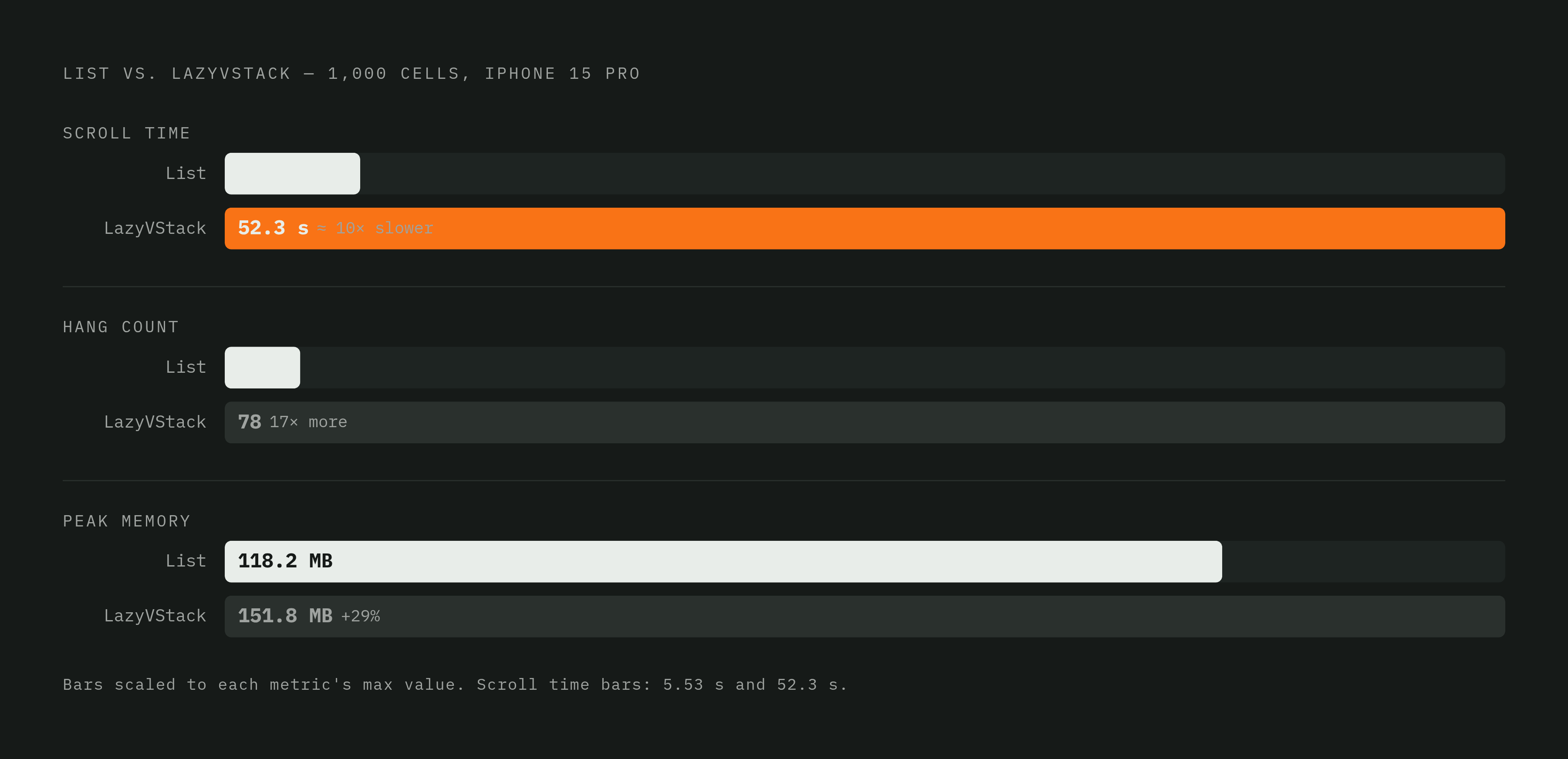
A test run against 1,000 cells of a memory-heavy view (a 20x20 grid of high-resolution images), on an iPhone 15 Pro running iOS 17.5.1, timed a rapid scroll from top to bottom and logged hangs through Instruments. The results aren't subtle.
List finished the full scroll in 5.53 seconds. LazyVStack took 52.3 seconds. That's not a small tax, it's close to a tenfold difference under this specific, admittedly extreme load. Hang counts back up the same story: List logged 4.6 hangs over the run, LazyVStack logged 78.
Memory tells a more complicated version of events. At launch, List actually starts heavier: 114.4 MB against 90.2 MB for LazyVStack, because List pre-warms its cell recycling machinery before it does any real work. Scroll down, though, and the picture flips: List is 128.9 MB while LazyVStack climbs to 149 MB. Scroll back to the top and the gap widens further. List drops to 118.2 MB, doing what recycling is supposed to do, while LazyVStack stays pinned at 151.8 MB. It loads lazily going down, which is the point of the container, but it doesn't seem to let go on the way back up.
Cause one: off-screen size estimation errors
The symptom is recognizable once you've seen it: scroll position jumps after a rotation, a programmatic scroll lands near its target and then visibly corrects itself, rows hitch into place as they enter the screen. All three come from the same root mechanism.
LazyVStack estimates total content height from whatever rows it's already measured. If onAppear triggers something that radically changes a row's height, loading metadata that expands a caption, say, or adjusting an image frame based on a title's measured height, the stack has to redo that layout math after the user is already mid-scroll. One specific anti-pattern appears often: a GeometryReader buried inside a row, computing something like .frame(height: max(160, measuredTitleHeight * 2)), where the frame itself changes once the view appears.
The fix is to settle a row's height before it ever appears. Push the layout-affecting computation into the view model, or into a computed property that's already resolved by the time the stack goes to measure the row. If the row's size is close to final on first measurement, there's nothing left for the layout pass to fight.
Cause two: unstable view identity and the scroll bugs it quietly introduces
SwiftUI relies on the id inside a ForEach to figure out which views changed, which ones to animate, and which ones to leave alone. If it has an unstable id, it loses the ability to tell a modified row from a brand-new one.
Two patterns cause this constantly. Using an index as the identifier, via enumerated() and id: \.offset, breaks the moment a single item gets inserted at the top: every index below it now points to a different row, and SwiftUI may happily preserve state for "row 5" even though row 5 is now a different article. Calling UUID() directly inside ForEach is worse in a different way: it mints a fresh id on every single render, so SwiftUI treats every row as brand new, every time. That means unnecessary view recreation, animations that fire incorrectly, and scroll position that resets without warning.
The symptoms line up exactly with the mechanism: saved state showing up on the wrong row after an insert or delete, incorrect animations, lost scroll position after a data refresh. The fix is straightforward once the cause is clear. Give the model itself a stable id, created once and held for the lifetime of that item, so SwiftUI has something reliable to diff against.
Cause three: over-broad state dependencies driving unnecessary body re-evaluations
SwiftUI re-runs a view's body whenever any of its dependencies change. If a row holds a reference to a large, shared view model, changing any property on that object, even one the row doesn't use, triggers a re-evaluation of every visible row watching it.
Apple made this point directly in the WWDC25 session on SwiftUI performance (session 306): a high volume of unnecessary body updates causes real performance problems even when each individual update is fast on its own. This is a frequency problem, not a speed problem, and treating it as a speed problem misses the fix.
Two changes address it. First, narrow what each row actually depends on: give it the specific fields it needs instead of a handle to the whole feed's state, so the body only describes layout rather than deriving data. Second, break rows into smaller, independent subviews, so that invalidation stays local. Tapping a save button shouldn't force the title and image beside it to re-render.
Cause four: misplaced state that the lazy stack is free to discard
LazyVStack builds views on demand as they scroll into range, and it does not promise those views will stick around. It actively tears down views once they've scrolled far enough out of the visible area. State stored directly on the view, an @State private var isSaved sitting inside a row, can vanish the moment that view gets discarded.
A user saves an item, scrolls away, scrolls back, and the saved state is gone. Combined with unstable identity from cause two, this gets worse, because the saved badge can reappear on a completely different row.
The fix is to move state out of the view and into the view model or a stable backing store, so the view reads its saved status rather than owning it. A related trap is the mode-parameter pattern, where something like a FeedMode value gets passed straight into each row to control visibility. That forces every row to re-evaluate its own visibility on every render, and if a mode change affects many rows at once, all of them re-evaluate simultaneously.
Expensive rendering modifiers and async image loading as secondary amplifiers
None of what follows is a root cause on its own. These are costs that make an already sound view a little slower, and make a structurally broken one considerably worse.
.blur, .shadow, and .mask can each trigger offscreen compositing, and applying any of them to every row in a long feed adds up fast, frame after frame. Use them sparingly, or scope them conditionally to just the rows that actually need the effect.
Async image loading in a scroll feed carries its own risk: fast scrolling can fire off simultaneous fetches for rows that appear for a fraction of a second and then vanish. A guard clause at the top of the fetch function, checking whether a request is already in flight, prevents the duplicate work. Apple's WWDC26 update to AsyncImage adds standard HTTP caching that respects server cache headers automatically, aimed at the 2026 OS cycle (iOS 27 / Xcode 27). For any feed heavy with remote images, that removes a whole category of redundant network calls without touching a line of app code.
When LazyVStack is the right container
None of this makes LazyVStack a container to avoid. It earns its place whenever the layout genuinely can't be expressed as a uniform platform list: mixed card shapes, full-bleed sections that break the row grid, horizontal scrollers nested inside a vertical feed, custom pinned headers, bespoke transitions between sections.
Reaching for LazyVStack out of habit, or because it feels more flexible, is the mistake, when the actual design is just a plain list of uniform rows that List would handle with less code and, as the benchmark above shows, considerably less hang time. LazyVStack is a tool for layouts List cannot express. It was never meant to be the default.