Retrieval-Augmented Generation Architecture for iOS Apps
On-device RAG solves retrieval and inference within iOS's strict memory and power constraints.
Retrieval-augmented generation gives a large language model a way to pull in facts it was never trained on, at the moment a user asks a question, instead of relying only on whatever it learned during training. The mechanism is straightforward: documents get split into chunks and converted into vector embeddings, those embeddings sit in an index, and when a query comes in, the system finds the most relevant chunks through similarity search and hands them to the LLM as context before it writes a response. That matters most for domain-specific or fast-changing content, where a static model trained months ago has no way of knowing what changed last week.
But an iOS app faces a version of this problem that cloud-based RAG systems don't. A phone has no guaranteed network connection, a strict thermal and memory budget, a sandboxed file system, and a user who expects an answer in under a second. Each of those constraints reshapes a decision somewhere in the pipeline. This is precisely the kind of platform-specific rigor that Phantomstory Demo emphasizes: mobile engineering deserves the same architectural precision as backend systems, and native iOS development requires thinking through constraints that generalist engineers often overlook.
The four-stage RAG pipeline on a device
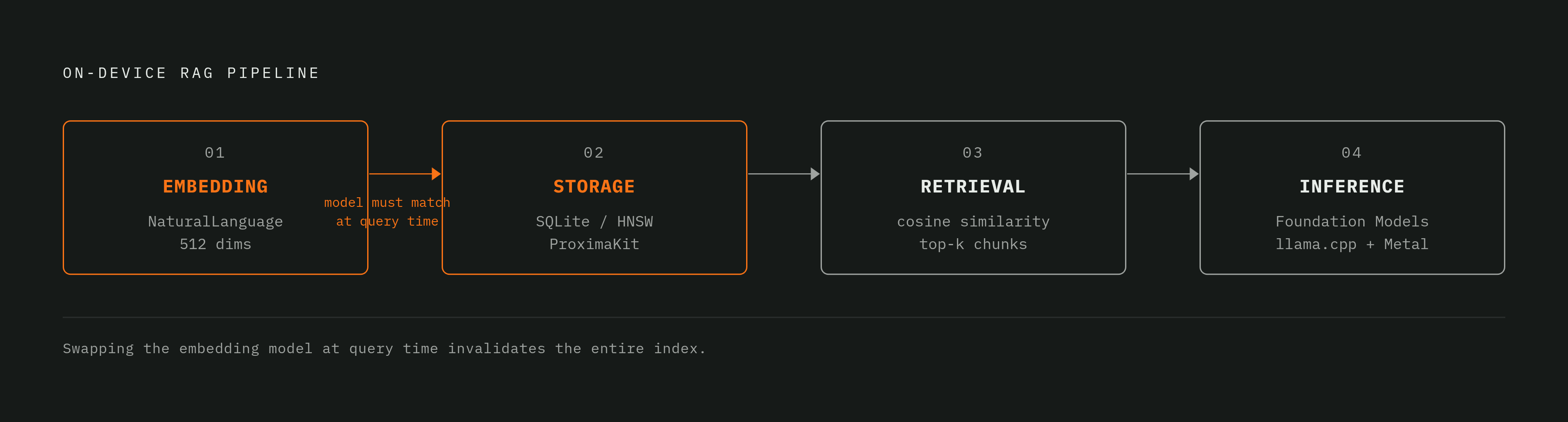
No matter where a RAG system runs, you can break it down into the same four stages. What changes on iOS is the budget each stage has to work with.
Stage 1 is embedding: raw documents become numerical vector representations so the system can measure semantic similarity between a query and a chunk of text. Stage 4 is augmented inference: the retrieved chunks get assembled into a prompt, and the LLM generates the final answer, fitting the whole operation inside the device's Neural Engine and memory envelope.
A server-side RAG system can throw a dedicated vector database at stage 2, and a GPU cluster can go at stage 4. Each of these stages has a preferred native tooling answer, starting with embedding.
Embedding on iOS: Apple's NaturalLanguage framework as the default starting point
Apple's NaturalLanguage framework gives you on-device word and sentence embeddings, and you don't need a network call or a model download, so if you're embedding documents in a native iOS RAG pipeline, this is where you should start. The open-source iOS-RAG project treats it as the default: it uses Apple NaturalLanguage at 512 dimensions as its recommended embedding model, describing it as "built directly into iOS, zero download required, instant semantic vectors and language understanding."
That convenience comes with a known trade-off. For short, well-scoped documents that loss barely registers. For long or structurally complex documents, it degrades how precisely the system can retrieve the right chunk later. iOS-RAG also documents two alternatives for engineers who want a different point on that curve: a Fast Token Hash model at 384 dimensions for lightweight corpora, and a High-Dim Token Hash model at 768 dimensions for larger ones. Neither requires leaving the device.
Chunking belongs in this same conversation, because how a document gets split before embedding decides how fine-grained retrieval can be. On the ingestion side, iOS-RAG handles PDFs through PDFKit with a Vision OCR fallback for scanned pages, plain text and Markdown files directly, and images through Apple's on-device OCR via VNRecognizeTextRequest. The choice of embedding framework and chunking strategy directly shapes performance and memory footprint, a decision iOS engineers accustomed to SwiftUI and native frameworks can make with confidence using Apple's built-in tools, but one that still demands a deliberate judgment about quality, latency, and storage rather than a default a generalist LLM engineer might reach for.
Vector storage on iOS: fitting a searchable index inside the sandbox
The gap between iOS and server-side RAG appears most directly in vector storage. There's no Pinecone or Weaviate instance living inside an iPhone's sandbox. Whatever stores the embeddings has to persist across app launches, scale to the corpus size the app actually needs, and search within the app's own file container.
The iOS-RAG project stores embeddings in a local SQLite database, at the path Application Support/rag.sqlite3, and when a query runs, it searches chunks by cosine similarity, so the app gets persistence and doesn't need any external dependency. That works fine for a small, bounded set of documents, but the cost of a linear scan grows with the corpus, and large document sets will eventually outrun it.
For apps that need retrieval to stay fast as the corpus grows, ProximaKit offers a different structure: a pure-Swift vector search library for Apple platforms that implements HNSW, Hierarchical Navigable Small World graphs, from scratch with no external dependencies, built on Apple's Accelerate framework. HNSW is the index structure behind most production vector databases, so if you have it in pure Swift, you get the same algorithmic efficiency without stepping outside the platform.
The right choice maps directly to scale. All three keep the data on the device, so the vector index never has to leave the user's phone, and that matters if your app handles sensitive documents.
Retrieval and reranking: how the system selects what the LLM sees
Retrieval quality sets the ceiling on what the LLM can produce. Feeding a capable model poorly retrieved context still produces a confident, wrong answer, because the model has no way to know the context it was handed is irrelevant.
The basic operation is simple: compute a query embedding using the same model used at indexing time, rank every stored chunk by cosine similarity to that query vector, and keep the top results. SwiftRAG exposes this directly through a function called searchRelevantDocuments(for:limit:), which computes the query embedding, sorts all stored documents by similarity, and returns the top matches, with a default limit of three chunks passed to the LLM as context.
The top-k parameter, how many chunks get passed forward, carries real consequences either way.
The instability warning here deserves to sit in the open. The iOS-RAG project states directly that its on-device RAG pipeline is currently unstable: retrieval-augmented generation can produce empty or incorrect responses depending on the model and document size, even in cases where plain LLM chat without retrieval works exactly as expected. So if you're building on an on-device stack today, test retrieval correctness against the specific models and corpus sizes in production, and don't just assume it holds.
On-device inference: what Apple's native frameworks provide for the generation stage
Generation on iOS has become a real native option rather than a forced compromise, because Apple's Neural Engine and its on-device model support have reached a practical threshold for the class of models a RAG pipeline actually needs. Apple's Foundation Models framework runs LLMs entirely on the device and keeps user data local, so the generation step in the pipeline executes without a single network call.
The iOS-RAG project takes a complementary path, using LLM.swift and llama.cpp with Apple's Metal hardware acceleration, and supports GGUF-quantized models at several sizes: Qwen2 0.5B Instruct at roughly 398 MB, TinyLlama 1.1B Chat at roughly 669 MB, and Gemma 4 E2B Instruct at roughly 3.11 GB. Model size maps directly onto storage and RAM budget, so you have to pick the model according to the target device, not just its raw capability.
SwiftRAG, by contrast, routes generation to a local Ollama instance over HTTP on localhost port 11434, using llama3.2:3b as its default model. Ollama is a developer tool that assumes a running local server, not an on-device runtime built for an end user's phone, and engineers who miss that distinction will ship an experience that breaks the moment it leaves a development machine.
You can define custom data structures with the @Generable macro and the Generable protocol in Apple's FoundationModels framework, and the on-device LLM understands them natively, which matters when you need RAG output as structured extraction. The Neural Engine in Apple Silicon handles the parallel tensor operations LLM workloads require and is what makes on-device inference at these model sizes a working reality.
Connecting the four layers into a production iOS RAG architecture
A production RAG pipeline on iOS needs more than four components bolted together after the fact. Each layer's decisions constrain what the next layer can do, and the seams between them are usually where things break in production.
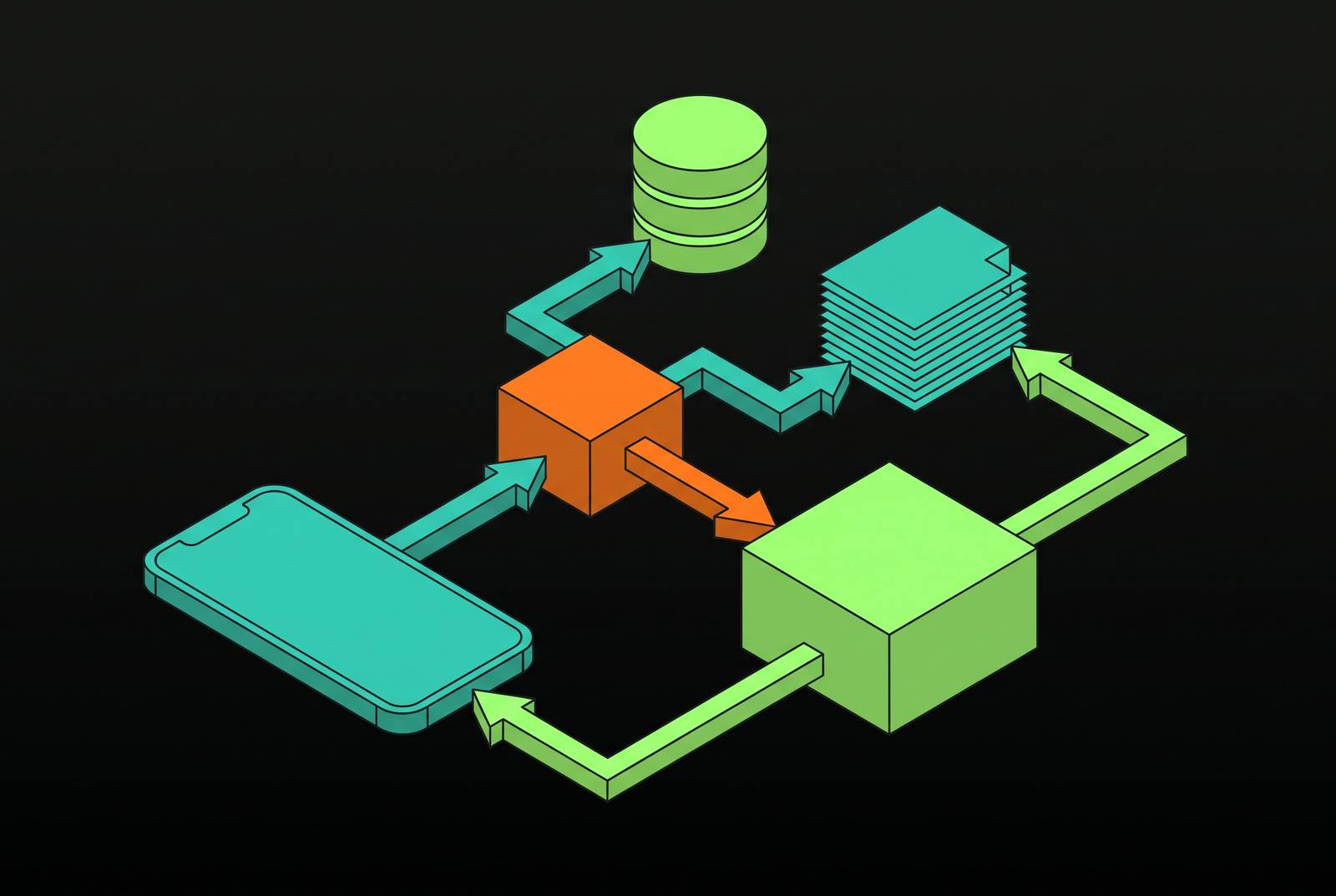
The data moves in one direction: document ingestion, including chunking and OCR where needed, feeds embedding through NaturalLanguage, which feeds storage in SQLite or an HNSW index, which waits for a query embedding computed at runtime, which drives cosine similarity retrieval and optional reranking, which assembles a prompt, which goes to the on-device LLM for generation, which returns a response to the UI.
One constraint threads through all of it: the embedding model used at indexing time has to be identical to the model used at query time. If you swap the embedding model, the entire stored index becomes invalid, and every document then needs a full re-embedding pass. You need to plan for that migration constraint before the first document gets indexed, not patch around it later.
When RAG becomes one capability inside a larger agent loop, Perception feeding Planning feeding Action feeding Self-Correction, the retrieval stage feeds into Planning rather than straight into generation, and App Intents expose the RAG capability to the rest of the system, so the agent never has to step outside the app's own sandbox.
Where on-device RAG breaks in practice
On-device RAG is not a solved problem that can be dropped into an app without validation. The iOS-RAG project says so directly in its own README: "The RAG pipeline is currently unstable." It goes on to note that on-device retrieval-augmented generation may produce empty or incorrect responses depending on the model and document size, even when plain LLM chat works as expected. That is an active engineering problem, with a fix listed as in progress.
The failure modes look different from what a server-side RAG system produces. It can return a confident but incorrect response because retrieved context got misapplied. It can get worse, not better, as the document corpus grows, which runs against the intuition that more data should mean better answers.
Engineers have real levers to pull against this. Retrieval results should be validated before they ever reach the LLM, surfacing an explicit "no relevant documents found" state when context is empty. Top-k limits should stay conservative. You have to test against the specific model and document sizes the production app will actually carry, not a convenient smaller sample. Performance profiling with Xcode Instruments belongs in this process too, run against realistic corpus sizes before shipping, because embedding and retrieval consume CPU and memory in amounts that unit test conditions do not reveal.
SwiftUI architecture patterns for a RAG-powered feature in a real app
RAG maps onto the same SwiftUI patterns you already use in a well-structured iOS app. Adding it extends existing architecture.
Separating these makes each layer independently testable and lets one implementation be swapped for another, say, SQLite storage for an HNSW index, without touching the rest of the pipeline.
A RAGViewModel, or a ChatViewModel carrying RAG capabilities, owns the query lifecycle: accepting user input, invoking retrieval, assembling context, dispatching to the LLM, and publishing results back to the view. Because retrieval and generation are both async, @Observable or local @State should drive loading indicators, empty states, and error states, and the distinction between "retrieving" and "generating" deserves its own treatment in the interface since they represent genuinely different waiting experiences for the user watching a spinner.
The @Generable macro fits naturally into this structure as well.
What a well-architected iOS RAG system looks like
A principled iOS RAG architecture is a layered set of decisions, one per pipeline stage, where the right answer at each layer depends on the app's scale, its privacy requirements, and the hardware it targets.
The decision map holds together cleanly: Apple NaturalLanguage for embedding, since it requires zero download, runs entirely on-device, and handles most document sets without issue; SQLite-backed cosine search for moderate corpora that need to persist, or HNSW through ProximaKit for larger indices where query latency matters; retrieval bounded by explicit top-k limits and validated before it ever reaches generation; Foundation Models or a llama.cpp-backed runtime for on-device inference, chosen according to the device target; and the whole pipeline organized as discrete Swift services coordinated by a ViewModel under structured concurrency.
Some constraints don't go away no matter how the architecture is tuned. The embedding model has to stay fixed once the index is built. On-device RAG pipelines remain unstable in some current implementations, so you need defensive engineering, not blind trust. Retrieval quality, not generation quality, remains the primary determinant of whether the final answer is any good.
The direction this is heading points toward RAG as one capability inside a larger agentic loop, where Perception queries the RAG index, Planning judges whether what came back is sufficient, and Action triggers re-retrieval or escalates to Private Cloud Compute when it isn't, with the Model Context Protocol supplying the standardization that makes all of it composable. AI agency on mobile is a genuinely new specialty, and the engineers who understand how each layer of a native RAG pipeline behaves under iOS constraints, and how to wire those layers into something reliable, aren't interchangeable with generalist engineers applying server-side habits to a phone.