React Native App Size and Binary Footprint on iOS
Native libraries account for most of React Native iOS bloat, not the JavaScript bundle.

Engineers who treat size as a fixed tax tend to respond in one of two unproductive ways: they accept the bloat and stop measuring it, or they abandon React Native on the assumption that a native rewrite is the only fix. Neither response reflects how size actually accumulates. A lean, modestly-sized app can grow into a heavily bloated app over 18 months of feature work, and that growth is never random. Every megabyte traces back to a decision made at a specific layer, and the rest of this piece walks through each one so that reduction work can target causes.
What lives inside a React Native iOS binary
Native libraries, compiled frameworks, and bundled media account for the larger portion of the file, which surprises engineers who assume the JS bundle is the primary weight.
Three categories drive the final number. Native libraries are compiled framework binaries pulled in by every npm-installed package that carries native code, and this is consistently the heaviest of the three. Asset bundling covers images, fonts, videos, and other media packaged at build time; an unoptimized image set alone can add substantial bulk to the IPA. The JS runtime and bundle, the Hermes engine plus the compiled JavaScript, is now the smallest of the three on a well-maintained codebase.
A separate distinction matters before any optimization conversation starts: what a local build reports is not what a user downloads. Xcode reports an uncompressed install size on the build machine. The App Store delivers something smaller, shaped by compression and by device-specific thinning, and that download size is the number that governs whether a user completes an install. Optional features add to this picture quietly. Offline support, in-app update engines, and local databases like SQLite or Realm all sit inside the native library layer, and each one adds real weight to the binary even when only a fraction of users ever touch the feature.
App Thinning and the Size a User Downloads
Because of Apple's App Thinning system, specifically App Slicing, what a user downloads is a device-specific variant built from the full IPA, not the IPA itself. The App Store generates and delivers a slice tailored to the requesting device, so the number a developer builds and the number a user downloads are never the same figure.
Asset catalogs make this possible. When images live in a catalog, Xcode tags a per-device variant for each, so a device with a lower-resolution display never pulls down assets sized for a device it isn't. Thinning adjusts the baseline, but the underlying need for optimization remains. A bloated binary becomes a smaller slice per device, but it stays a bloated binary relative to what disciplined asset and library management could produce.
One artifact from older optimization guides no longer applies. Bitcode was deprecated starting with Xcode 14, and the App Store stopped accepting Bitcode submissions from that release onward. The "Enable Bitcode" setting should be set to No, and any guide still treating Bitcode as a size lever is describing a mechanism that no longer exists in the pipeline.
Layer 1: What Hermes controls in the JS runtime
Hermes is the single highest-leverage control inside the JS layer, with the smallest ceiling for size reduction in a typical production app. As of React Native 0.84, Hermes V1 is the default JavaScript engine on both iOS and Android, following its initial opt-in at 0.82. Teams already running Hermes, the default since 0.70, picked up V1 automatically, and JavaScriptCore had already stopped being the default well before 0.84 arrived.
That timeline matters for how a team should think about effort. Switching to Hermes is no longer a choice to weigh; it is the starting condition for nearly every current React Native project. The size savings that come from Hermes are modest next to what native library or asset work can recover.
JS bundle discipline still earns its keep even with Hermes in place. A lean main bundle reduces parse overhead on top of Hermes' ahead-of-time compilation, and Metro's tree-shaking strips out dead code that would otherwise ship inside the bundle. Code splitting deserves a clear distinction here too: it speeds up cold start by deferring what loads at launch, but it does not shrink the IPA a user downloads. The same logic applies to lazy loading generally. Startup performance and download size are two separate wins, and crediting one for the other leads a team to under-invest in the layers that actually move the download number.
Layer 2: Native library linkage, why every npm install has a binary cost
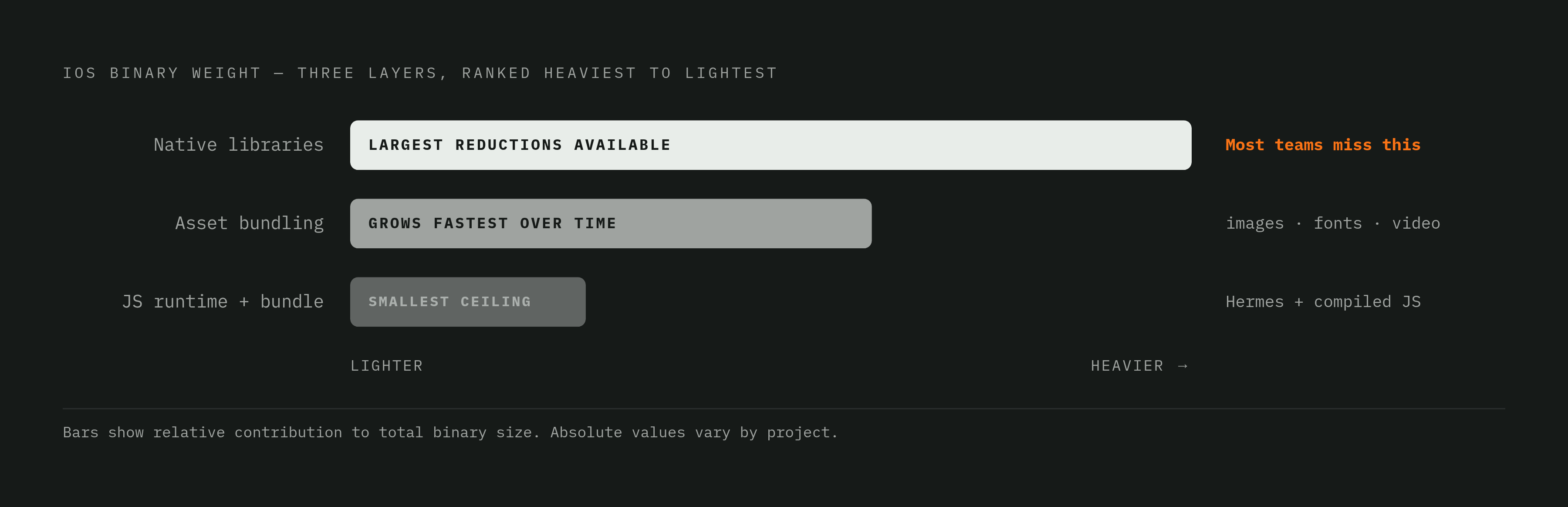
Native library linkage is where most of a React Native iOS binary's weight lives, and it is where the largest reductions are available. Every third-party package that ships native code compiles into a framework binary that links into the app, and the cumulative weight of those frameworks dwarfs the JS bundle in almost every production app examined at this layer.
The mechanism is straightforward: an npm install of a react-native-* package with native modules pulls in compiled iOS frameworks at build time, and those frameworks sit inside the binary regardless of how often the feature they support gets used at runtime. A payment SDK used by only a small fraction of sessions still ships its full compiled footprint to nearly every install.
The New Architecture changes only part of this equation. TurboModules are lazily initialized at runtime, so an unused native module no longer costs anything at startup. But the compiled framework binary for that module still ships inside the IPA unless the dependency itself is removed from the build. TurboModules fix a startup-cost problem, not a binary-size problem, so if you treat them as a size fix, you skip the audit work that actually recovers megabytes.
React Native 0.82 permanently removed the opt-out flag for the old bridge-based architecture, and later versions completed the removal of legacy bridge code from the framework itself. That cleanup eliminated a category of architectural complaints that had accumulated around maintaining two runtime paths side by side, and teams building on the New Architecture now start from a cleaner baseline than teams did even a year earlier.
None of this replaces the audit itself. You need to check native modules actually exercised in production against the list of what's installed, on a recurring basis, because unused or redundant packages are dead binary weight that lazy initialization does nothing to recover at the IPA level. Software Mansion's 2026 benchmark comparing Kotlin Multiplatform and React Native measured iOS download size by archiving for Ad-Hoc distribution and analyzing the App Thinning Size Report that Xcode generates during export. That same method works as a standing audit process for any React Native iOS project trying to find out which dependency is actually responsible for a size jump.
Layer 3: Asset bundling, where size accumulates invisibly and fastest
Asset bundling grows faster than either of the other two layers over a product's lifetime, because assets get added continuously by design and product workflows that sit outside normal engineering code review. A pull request that adds a native dependency gets scrutiny. A new set of marketing images dropped into the asset pipeline usually doesn't.
Images cause most of the damage. If you include high-resolution images without optimization, or without proper asset catalog tagging, every device variant downloads assets it will never render at full resolution. Fonts present a quieter version of the same problem: bundling an entire typeface family, including weights and variants the UI never calls, is common practice and easy to miss, and auditing or subsetting font files is one of the most direct size levers available to a team that hasn't touched this layer before.
Asset catalogs are what make the App Thinning system described earlier actually work. Xcode generates and tags per-device image variants automatically when images live inside a catalog, which is what allows App Slicing to deliver the right file to the right device. If images sit directly in the bundle directory, bypassing the catalog, they skip this mechanism entirely and ship undifferentiated to every device regardless of resolution.
Localization compounds the problem in a way that's easy to underestimate. Every additional supported language adds a full copy of every string resource, so growth scales with the product of string count and language count, not with either figure alone. One more distinction belongs in this layer specifically: download size and install size respond to different fixes. Compressed image formats reduce what a user downloads. Uncompressed assets inflate what sits on the device after install. Both numbers matter, but they respond to different engineering decisions, and conflating them leads to optimizing the wrong one.
Layer Size, Install Conversion, and User Reach
Binary size functions as a user acquisition variable, not just an engineering metric. Each incremental increase in download size reduces the probability that a user who taps "Get" actually completes the install, and the effect sharpens once an app crosses Apple's cellular download threshold, where the system interrupts the download and asks the user to confirm over mobile data.
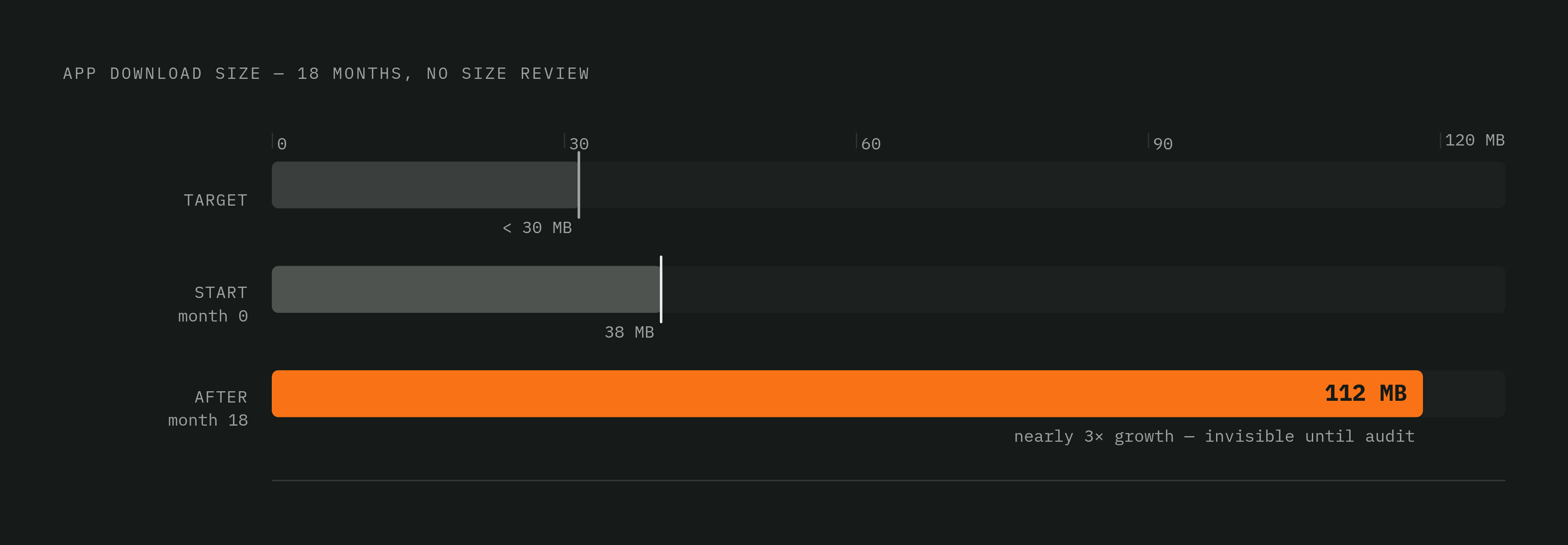
The effect does not land evenly across markets. Users on older devices, with limited storage or metered connections, feel an oversized app more than users on new hardware with a fast network connection, and an app that ignores this becomes an accessibility failure precisely in the markets where mobile growth is fastest. One production case illustrates how this plays out without anyone intending it: a React Native app grew from a lean 38 MB to a bloated 112 MB over 18 months with no size review process in place. Nobody noticed, because nobody was looking, and the growth stayed invisible until a business consequence forced the audit that should have been running the whole time.
Many development teams aim for an initial binary under 30 MB as a practical target, even though top-charting apps frequently land well above that figure. The number matters less as a hard rule than as a target a team engineers toward on purpose, rather than a number it backs into eighteen months after launch with no idea how it got there.
Where the AI layer detonates the size budget
On-device AI features introduce a size constraint, so the discipline described above applies with full force to the AI layer as well. The inference runtime itself adds weight to the binary before any model ever loads. ExecuTorch, the on-device inference runtime that reached general availability in October 2025 and is now developed as part of PyTorch Core under vendor-neutral governance, is one example of a runtime choice that carries real binary overhead, and picking a runtime is a size decision with consequences on the same order as native library linkage.
Bundling a model's weights directly into the app binary is a different category of problem from everything discussed so far. So the standard approach ships a lightweight app shell instead and pulls model weights down after install, using On-Demand Resources or a background download manager, which keeps the initial download small even if the feature depends on a multi-hundred-megabyte model. Quantization is the current standard for shrinking what does need to ship: 4-bit quantization techniques have matured to the point where they cut model size dramatically while keeping accuracy loss minimal, and this has become standard engineering practice rather than an optional refinement teams reach for only under pressure.
React Native faces a structural disadvantage here that a native Swift app does not have. Apple's on-device Foundation Models live inside the operating system itself, and a native Swift or SwiftUI app can call into them without any of those model weights counting against the app's own binary. A React Native app cannot reach that API layer directly. If a team does this, it needs a native bridge module, which reintroduces the native library linkage overhead discussed earlier and demands real native Swift expertise. Whether that hybrid approach is viable at all depends entirely on whether the team has the native Swift capability to build and maintain the bridge.
The measurement process that makes size a managed engineering variable
Size bloat in production is almost never a knowledge gap. The team behind the 38-to-112-MB app in the earlier example knew the optimization techniques described throughout this piece. What they lacked was a feedback loop that would have surfaced the growth before a business consequence forced the issue.
Building that feedback loop starts with measuring the right artifact. The local build size Xcode reports is not what a user downloads. You can find the number that corresponds to real user experience, the App Store download size, through App Store Connect, along with the App Thinning Size Report generated from an Ad-Hoc archive. Software Mansion's 2026 benchmark used exactly this pairing, Ad-Hoc distribution archives plus the App Thinning Size Report, to measure iOS download and install sizes when comparing Kotlin Multiplatform and React Native, and you can run the same method as a repeatable check on every build, not just as a one-time comparison.
A size budget turns that check into a standing discipline: a numeric ceiling on download size, tracked per build, with CI configured to flag any regression automatically. That single change moves size from a lagging indicator, something discovered after a user complaint or an App Store review, to a leading one, caught at the pull request before it ships. The budget also does something more specific than catch growth in the aggregate. A regression introduced by a new native dependency shows up differently in the size report than a regression introduced by an unoptimized image, and the report points directly at the layer responsible. An engineer who understands all three layers, and who measures them on every build rather than once a year, architects against bloat from the start.