Metal vs Core Animation for Custom UI Rendering
Know when Core Animation stops keeping up, backed by profiler data instead of instinct.
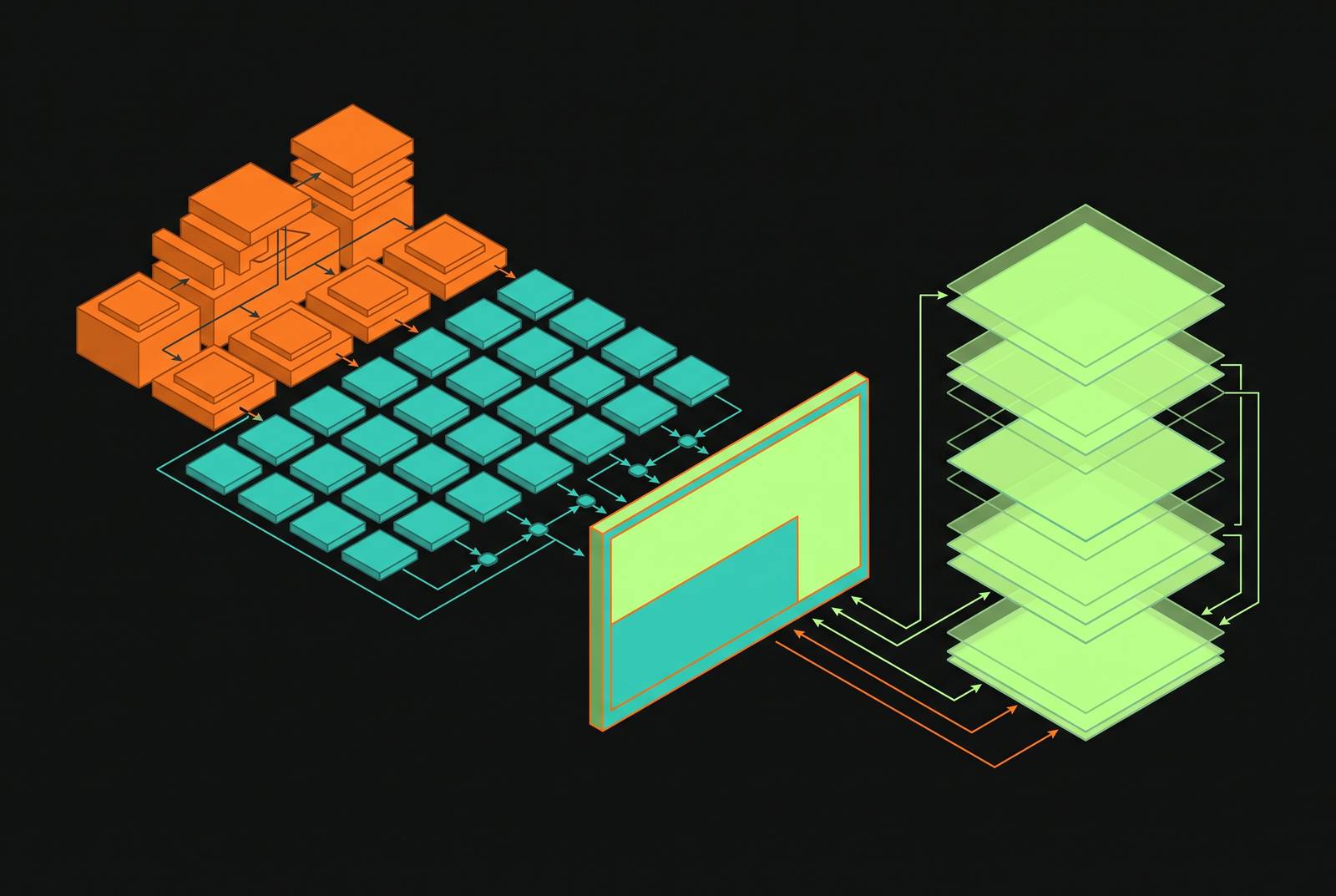
Every image on an iPhone, from a plain UIView background color to a full-screen game frame, gets drawn by Metal before it ever reaches your eyes. Application code hands a view hierarchy to a separate render server process, which passes it through Core Animation, which passes it, finally, to Metal. Most engineers never write a line of Metal and never need to. What separates a senior iOS engineer from a generalist is not knowing Metal: it's knowing exactly where Core Animation stops keeping up, and backing that call with profiler data instead of a hunch. Get the sequencing wrong, in either direction, and you either burn weeks hand-rolling GPU code nobody needed, or you ship an app that drops frames a single .drawingGroup() call would have fixed.
The chain, in concrete terms, runs from CALayer down through Metal-backed rendering to the display, with Core Animation coordinating the render loop against the screen's refresh rate. None of this is new: Core Animation got a Metal backing as of iOS 9 and macOS 10.11, and the GPU has driven every UIView for close to a decade now. The distinction that actually matters is declarative versus imperative, not "Core Animation versus Metal" as rival technologies. Core Animation lets you state what you want on screen and trusts the system to work out how to get it there. Metal makes you write out, instruction by instruction, what the GPU does.
The case for Core Animation as the correct default for nearly all production iOS UI
Default to Core Animation. Reaching for Metal first is the wrong instinct almost every time. SwiftUI renders through Core Animation by default, and most developers get their performance headroom there without ever opening a shader file. Deep Metal knowledge has historically lived almost entirely inside game studios, for the simple reason that Core Animation was built specifically so app developers wouldn't need that skill.
Apple's 2026 "Liquid Glass" interface language makes that design logic obvious. The adaptive materials, the specular highlights, the concentric corner shapes: all of it comes free the moment you use a standard SwiftUI or UIKit system control. Skip those controls and try to hand-roll that same visual behavior in raw UIKit. The engineering cost balloons fast. Real-time material blending and specular response are exactly the per-pixel behavior Core Animation exists to hide from you.
The performance bar has also moved. ProMotion displays push a 120 FPS target now, not 60, so the margin for error on frame timing is half what it used to be. Instruments, the standard profiling tool, watches raw frame rate and flags GPU bottlenecks from stacked blur effects, heavy layer shaders, or shadows sitting on layers that don't need them. Most dropped frames in production apps trace back to one of those three causes, not to a deep architectural flaw.
The middle path: drawingGroup() and WWDC 2026 layer shaders before you touch Metal
SwiftUI's .drawingGroup() modifier is Metal already doing the work behind the declarative layer. It rasterizes a view into an off-screen Metal texture before compositing, so the GPU work happens either way. You just never leave SwiftUI's syntax to get it.
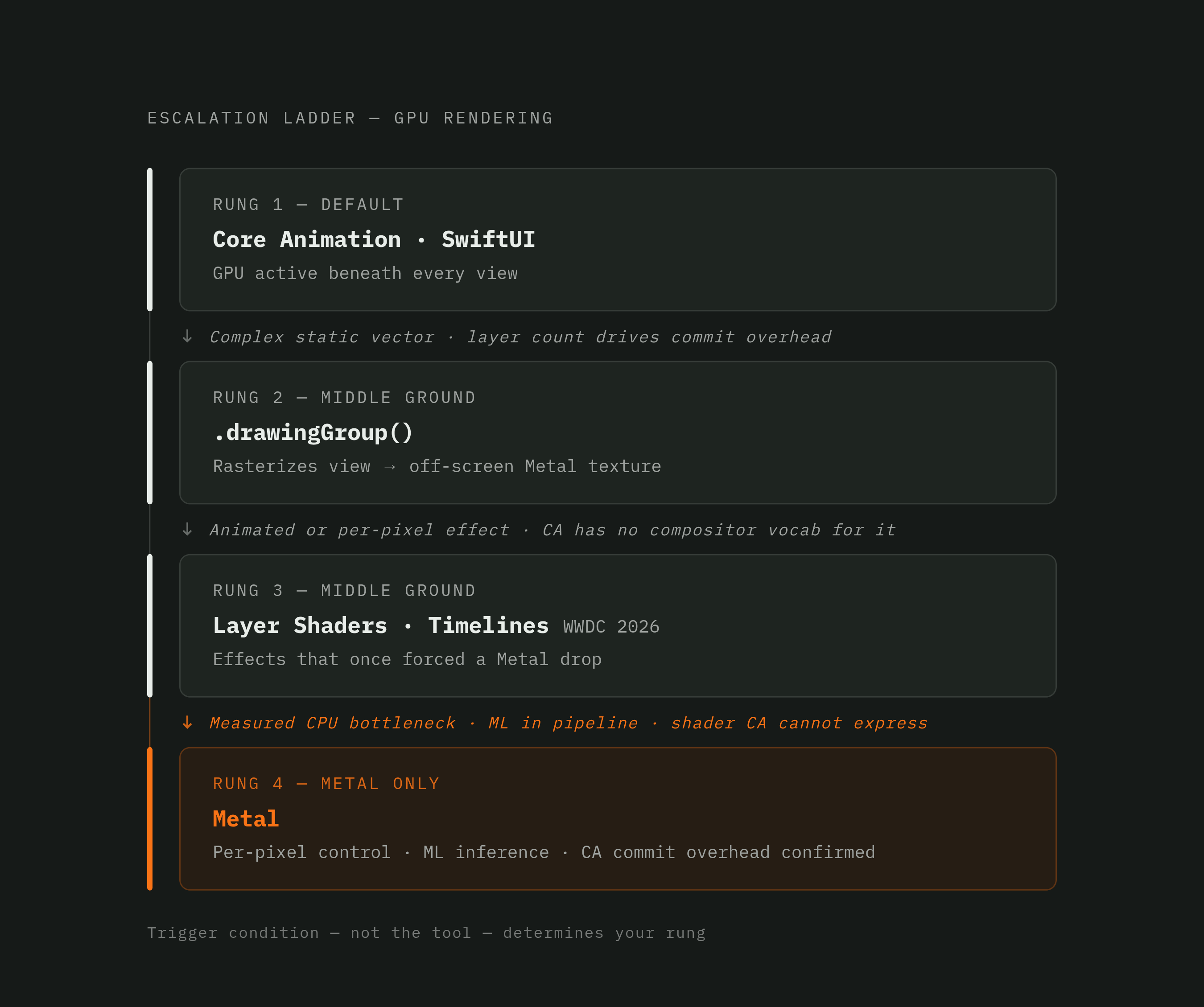
It earns its place in one specific case: complex vector content that stays static during animation. Layered shapes, intricate paths, anything expensive to redraw every frame but visually unchanged while it moves. It backfires the moment that assumption breaks. If the content inside the group changes during the animation, the off-screen render pass fires on every single frame instead of once, and the optimization turns into a net cost sitting on top of the original problem. Add .drawingGroup() after a real, measured performance problem appears in a profile. Don't add it as a preemptive habit, because half the time there's nothing there to fix.
WWDC 2026 widened this middle ground by a lot. Developers can now write layer shaders directly, drive animation through timelines, and anchor view placement with alignment guides, all inside SwiftUI's declarative model. Chained together, these tools now cover a set of effects that used to force a drop into Metal or a wrestling match with raw CALayer code. The range of problems that actually require Metal has gotten narrower, not wider, even as visual expectations climb every year.
Where Core Animation hits its ceiling: a concrete 2026 case study
A case documented on one developer's blog lays out exactly where the declarative model runs out of road. The setup: a photo grid rendered at 31 columns, mirroring the Photos app's zoom levels, with thousands of UICollectionViewCell instances visible on screen at once.
Each cell costs something. Layout, cell reuse, PhotoKit callbacks, image view assignment, and a Core Animation layer commit all happen per cell. At a handful of columns, that overhead disappears into the noise. At 31 columns and thousands of simultaneous cells, it compounds into something Instruments can measure precisely: UICollectionView.layoutSubviews ate roughly 46% of main-thread samples in that profile.
That number points somewhere specific. It's a CPU problem, not a GPU fill-rate problem, caused by Core Animation committing thousands of individual layer objects every single frame. That's the whole diagnostic point of the case study: when the bottleneck is per-element CA overhead on the CPU, Metal fixes it not by being faster in some abstract sense, but by collapsing thousands of separate layer commits into far fewer GPU draw calls.
The decision criteria for reaching into Metal
Reaching for Metal is a trade, not an upgrade, and treating it as an upgrade is where most Metal adoption goes wrong. It buys full control over the GPU. It costs explicit memory management, hand-written shaders, manual pipeline state setup, and every safety net SwiftUI's declarative model hands you for free. That trade is worth making only in a short, specific set of situations, and nowhere else.
Thousands of elements where per-element Core Animation overhead becomes a measured CPU bottleneck, exactly as in the photo-grid example above, is one confirmed case. Custom real-time shader work, particle systems, procedural backgrounds, full-screen visual effects, is another. Three-dimensional scenes and game render loops belong here too, along with machine learning inference embedded directly in the render pipeline, which Metal 4 now treats as a first-class case. Real-world image processing counts as well: one image-editing app rebuilt its graphics pipeline on Metal, adding Apple silicon support alongside a heavier bet on machine-learning-driven editing tools, a clear signal that professional creative software treats this trade as worthwhile once the workload actually demands it.
The order matters as much as the list itself. Profile with Instruments first, and find out whether the real bottleneck is Core Animation commit overhead, GPU fill rate, or something else. Guessing wastes more engineering time than it saves. Try WWDC 2026's layer shaders and .drawingGroup() before writing a single line of Metal. Reach for Metal only once CA commit cost becomes the measured bottleneck in a profile, or the effect needs per-pixel shader control Core Animation simply has no vocabulary for.
None of these justify Metal on their own: visual complexity nobody has actually profiled, a preference for lower-level code because it feels more serious, or the instinct to grab "the fastest tool" on principle. The fastest tool is whichever one solves the problem Instruments actually found. Everything else is engineering effort spent chasing a hunch dressed up as a hypothesis.
Metal 4 and the current API baseline for new work
Metal 4 shipped at WWDC 2025, went stable that June, and now sits as the baseline for any new Metal work. It changes five things that matter for real projects, not incremental polish.
Command encoding got restructured around explicit memory management, native parallel encoding across command buffers. Resource management got more direct control, less indirection. Shader compilation also received improvements in this release. Machine learning integration got folded straight into the rendering pipeline: inference can run inside shader code itself through the Shader ML path, or route through a separate ML Command Encoder built for larger networks at the command-buffer level. Both approaches are available side by side depending on how big the model is. MetalFX also picked up Frame Interpolation and a denoised upscaler built for ray-traced content.
None of this is a niche update. Roughly 70% of the top 100 grossing App Store games already run on Metal, mobile gaming revenue passed $31 billion last year, and the AR sector is projected to top $12 billion by 2026. Metal 4's changes land directly inside the workloads generating that revenue.
The shared substrate of the rendering stack and the on-device AI stack
Apple Intelligence runs on-device: the model loads directly onto the device's Metal GPU and its Neural Engine, a load Apple describes as a few hundred megabytes taking a few seconds. That's the same GPU rendering the UI, not some separate chip carved out for AI work off to the side.
The Foundation Models framework gives Swift-native access to Apple's on-device large language model, a roughly 3-billion-parameter model running entirely on Apple silicon, splitting work across CPU, GPU, and Neural Engine as needed. Core AI, a newer framework built for running custom models on-device, is tuned for unified memory and the Neural Engine, and supports models with a substantially larger parameter count running locally in native Swift, no server round-trip, no per-token cost.
Local LLM development on iOS increasingly depends on the same GPU and Neural Engine resources that drive rendering. Understanding Metal now matters to any engineer building AI features into an app, for a plain mechanical reason: the rendering GPU and the inference engine are the same piece of silicon, running the same memory pool, competing for the same cycles.
Applying the framework: the architectural judgment that separates senior engineers from generalists
As a checklist rather than a preference: default to Core Animation and SwiftUI, since the GPU is already doing the work underneath, and the 2026 design language rewards engineers who stay inside the declarative model instead of fighting it. Profile before escalating anything, using the Core Animation instrument alongside Metal System Trace, and let the data name the bottleneck instead of assuming one going in. Try .drawingGroup() or the new WWDC 2026 layer shaders before writing shader code by hand. Reach for Metal only once per-element CA overhead is the measured CPU cost, or the effect genuinely needs per-pixel GPU control, or ML inference has to live inside the render pipeline itself.
Treating Metal as the serious choice by default, regardless of what a profile shows, is the generalist mistake, and it's a costly one. It adds real complexity and real maintenance burden, and it often makes an app slower, because it throws away optimizations Core Animation already provides for free and replaces them with hand-rolled code that has to reinvent them from scratch, badly, under deadline.
A senior engineer's value comes from holding the whole stack in view at once: understanding that Core Animation commits, GPU fill rate, Neural Engine inference, and Metal command encoding are pieces of one system, and choosing which layer to work in based on evidence, not instinct. As on-device inference moves deeper into the rendering pipeline through Metal 4, that dual fluency, knowing the rendering stack and the AI stack now run on the same silicon, is what lets an engineer design interaction patterns nobody's shipped yet, and recognize the exact moment one becomes possible.