SwiftData vs Core Data for New iOS App Data Layers
SwiftData is the default for new iOS 17 apps, but Core Data still wins in specific cases.
Choosing between SwiftData and Core Data for a new iOS app is not a style preference. It's an architectural bet on schema design, migration strategy, and concurrency patterns that will calcify within the first few months of a project and stay hard to unwind. For most new projects targeting iOS 17 and later, SwiftData's Swift-native, code-first model is the correct default. But Core Data hasn't gone anywhere, and there are specific, nameable conditions under which it still wins.
The timing matters too. Between 2023 and 2025, the persistence landscape shifted more than it had in years: SwiftData arrived, MongoDB announced deprecation of its Atlas Device SDKs (formerly Realm) in September 2024 with Realm Sync shutting down September 30, 2025, and Swift 6 changed how the compiler treats concurrency by default. An engineer starting a project today is choosing from a genuinely different menu than one who started a few years ago. On day one, the app's conditions determine which framework's constraints actually fit. It's which framework's constraints actually fit the app's conditions on day one, because ripping out a persistence layer mid-project means rewriting model types, migration paths, and every fetch-dependent view in the app. That's not a weekend task.
What SwiftData is under the hood, and why that matters for trust
SwiftData is not a new storage engine. It sits on the same SQLite infrastructure Core Data has used for years. The two frameworks are, at the foundation, reading and writing the same kind of file. What changed is the layer above that file: SwiftData replaces the.xcdatamodeld visual editor with macro-based model declaration, and replaces manual entity configuration with automatic schema inference.
Core Data's lineage explains a lot about how it feels to use. It arrived in macOS Tiger back in 2005, built in the Objective-C era, and it sat alongside UIKit and AppKit as a peer framework in the Cocoa ecosystem. Even used from Swift today, the API still carries that history in its verbosity and its assumptions about how an app is put together. SwiftData, introduced at WWDC 2023 and available from iOS 17 and macOS 14 onward, takes a different approach: it uses Swift Macros, a compile-time feature that shipped with Swift 5.9, to turn a plain Swift class into a persistent model without a separate schema file.
Because both frameworks ultimately land on the same kind of SQLite file, raw performance differences come from the abstraction layers sitting above the storage engine, not from the storage itself. That shared foundation also means the two frameworks can be used alongside each other in the same project, with some configuration requirements to take seriously (more on that later).
Model declaration, boilerplate, and SwiftUI integration in practice
Declaring a SwiftData model means annotating a plain Swift class with @Model. No separate schema file, no NSManagedObject subclass, no @NSManaged property wrappers scattered through the code. Core Data requires an.xcdatamodeld XML schema file, a generated or hand-written NSManagedObject subclass, and a fair amount of context and coordinator setup. None of this is accidental complexity. Core Data was designed around that boilerplate, not burdened by it as an afterthought.
The gap between live-updating SwiftUI results and manual refresh logic is visible most sharply in SwiftUI itself. SwiftData's @Query property wrapper gives a view live-updating results in a single line, and changes to the underlying model propagate automatically through the Observable machinery. Core Data's @FetchRequest still works fine, but it needs manual context injection into the environment, and relationship updates often need extra glue code to behave. That friction isn't a bug Apple forgot to fix. Core Data predates SwiftUI by roughly a decade and was never rebuilt around it.
For a brand-new project, this compresses the entire setup phase. A working fetch-and-display loop in SwiftUI takes fewer lines of code and fewer concepts to hold in your head with SwiftData than with Core Data. That gap matters most early on, which is exactly when the persistence decision gets made. The pull toward Core Data out of habit and familiarity is real and understandable, but the ergonomic cost of that habit compounds every time a new screen needs a new fetch.
Where SwiftData's performance profile holds and starts to strain
At normal data volumes, the shared SQLite engine means read and write performance between SwiftData and Core Data is comparable, and a user will not notice it in daily use. Fatbobman.com, a well-regarded source on Apple persistence internals, lays out the performance hierarchy: direct SQLite access beats Core Data, which beats SwiftData. Every abstraction layer stacked on top of the raw database adds some overhead, and SwiftData currently sits at the top of that stack.
One engineering source advises steering away from SwiftData once an app crosses somewhere around 50,000 to 70,000 records, or once relationships get genuinely complex, recommending GRDB or Core Data instead. One engineering source advises steering away from SwiftData once an app crosses somewhere around 50,000 to 70,000 records, or once relationships get genuinely complex, recommending GRDB or Core Data instead past that point. SwiftData gives less manual control over fetch request tuning, memory footprint, and merge policies than Core Data does, and at scale, Core Data's fifteen-plus years of optimization work start to show.
Automatic saving is convenient until it isn't. SwiftData's autosave can, on rare occasions, fail silently, and because these issues surface on real devices rather than the simulator during testing, they are hard to catch before shipping. A well-known failure mode involves storing large binary assets directly inside a SwiftData model and fetching them all at once on the main thread, causing progressive performance collapse. Store metadata in the database and keep large binary assets on the filesystem, referenced by path; this lesson is old and applies to any persistence framework. SwiftData's implicit, low-ceremony behavior just makes that mistake easier to stumble into. On top of that, SwiftData currently uses more memory than Core Data under large-dataset conditions, which matters on older or resource-constrained devices.
Concurrency: how Swift 6 and SwiftData's main-actor isolation interact
Swift 6's strict concurrency mode turns data races into compile-time errors instead of runtime warnings, which is a real departure from Swift 5's opt-in model. SwiftData models are @MainActor-isolated by default. For view-bound data, that's the safe and usually correct call, but any background persistence work needs a ModelActor to stay outside the main thread.
Swift 6.2 doesn't change the underlying safety rules, just the default posture. SE-0466 lets an entire module default to @MainActor isolation through SWIFT_DEFAULT_ACTOR_ISOLATION = MainActor, with the @concurrent attribute serving as the deliberate escape hatch for CPU-heavy work like decoding or image processing. Most of the compiler error wall that made Swift 6 feel punishing at first dissolves under this default, without giving up any of the actual safety guarantee.
For SwiftData specifically, this lines up well: the bulk of view-bound fetch-and-display code sits naturally on the main actor, and background writes are the deliberate exception, handled explicitly through ModelActor. That's a cleaner, more legible contract than Core Data's thread-confinement rules, which are powerful in the hands of someone who respects them and a reliable source of crashes in the hands of someone who doesn't. For a UI framework that leans on a declarative, state-driven model generally, @Observable classes (with @MainActor annotation where needed) are the right tool, with plain structs reserved for state that doesn't need persistence. Teams still considering Core Data for a new project don't get to skip Swift 6's concurrency requirements. Core Data's threading model simply doesn't map onto Swift 6's isolation rules as naturally as SwiftData's does.
Schema migration in SwiftData today, and where Core Data's heavyweight tooling still has no equivalent
As of 2025, SwiftData handles lightweight migrations well: adding a property or other changes the framework can infer automatically. What it doesn't yet handle is heavyweight migration involving custom, complex data transformation logic. The VersionedSchema and SchemaMigrationPlan APIs give a real, usable, declarative way to describe how a model changes release over release, but they don't yet cover the full range of transformations Core Data's custom mapping models support.
Core Data offers both automatic lightweight migration and a more manual heavyweight path, where a custom mapping model gives fuller control over how data transforms between schema versions. That heavyweight path exists precisely for cases where the new schema can't be derived from the old one through inference alone, such as structural changes the framework cannot infer on its own.
iOS 26 adds model inheritance to SwiftData, and the migration API keeps improving release over release. Even so, as things stand, complex migration scenarios still expose a gap between the two, with consequences that show up in practice rather than only in theory. If a data model is likely to undergo structural surgery, splitting entities, merging relationships, transforming stored values in ways that can't be inferred, Core Data's migration tooling is materially more capable today. If migrations are expected to stay additive and incremental, which is the common case for a consumer app shipping features over time, SwiftData's lightweight path is sufficient and comes with far less ceremony.
The specific scenarios where Core Data is still the correct choice
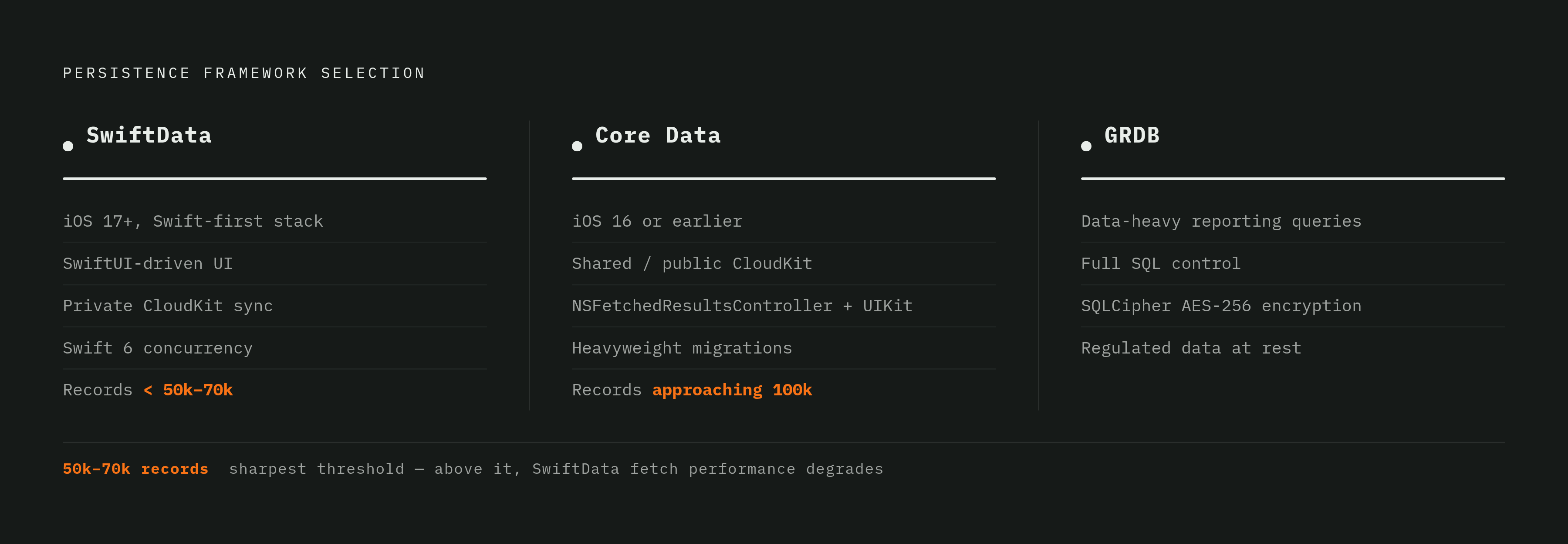
Some conditions settle the question. Supporting iOS versions below 17 rules out SwiftData entirely; Core Data is the only Apple-native option on the table. Apps built around complex, multi-user CloudKit sync should also take note: SwiftData's iCloud integration currently covers private data only, and Core Data's support for shared and public CloudKit databases is more mature. A collaborative, multi-user data model built on SwiftData today runs into that ceiling quickly.
Data volume is another hard line. Once record counts approach or cross that 50,000 to 70,000 threshold, Core Data's tuning levers, fetch request optimization, batch operations, careful memory management, start to matter in ways SwiftData's abstractions actively work against.
There's also a list of Core Data features SwiftData simply doesn't have yet: NSFetchedResultsController and the fine-grained UIKit table and collection view change tracking it enables, NSCompoundPredicate for genuinely complex query logic, batch insert, delete, and update operations, and group-by queries paired with fetch result controllers. An app that leans on any of these has its answer already.
Neither SwiftData nor Core Data offers built-in encryption for data at rest. For data at rest scoped to certain regulatory compliance requirements, the correct path runs through a lower-level SQLite wrapper paired with an encryption solution. This is a case where neither Apple-native framework wins, and pretending otherwise creates real compliance risk.
Finally, two situational cases: an existing Core Data codebase that's stable and working rarely justifies a rewrite unless the team is already blocked by Core Data's ergonomics, and any app whose persistent store needs to be shared with an Objective-C extension should treat SwiftData's Swift-only model as a genuine liability.
GRDB as a third option
GRDB.swift wraps SQLite directly, and that's the whole point of it. It gives full SQL power, reactive UI updates, and precise control over the actual database file, rather than approximating a database through an object graph. SwiftData and Core Data both treat data as objects first; GRDB treats data as a database, where SQL predicates, joins, and reporting queries are first-class citizens instead of workarounds bolted onto an ORM.
The tradeoff is often put bluntly by engineers who've worked with both: GRDB for anything data-heavy, SwiftData for simple apps that will stay simple.
Because SwiftData stores everything in SQLite, a genuinely pragmatic hybrid exists: use GRDB for complex reporting or ad-hoc queries, while the app handles its everyday persistence needs through SwiftData. Encryption is the other place GRDB earns its keep. Paired with SQLCipher, it's the practical route to 256-bit AES encryption at rest, something neither Apple-native framework offers. None of this makes GRDB the default choice for a new greenfield SwiftUI app. Setting up GRDB requires SQL knowledge and added configuration work. But when data complexity or regulatory scope outgrows what SwiftData handles cleanly, GRDB is the honest answer.
Migrating an existing Core Data app to SwiftData incrementally
A coexistence pattern running Core Data and SwiftData stacks alongside each other is technically possible, but it carries configuration requirements that are easy to miss and expensive to debug after the fact.
The incremental path looks like this in practice: map existing Core Data entities to SwiftData @Model types, keeping the new schema as close to the old one as practical, configure the ModelContainer, then move SwiftUI screens from @FetchRequest to @Query one screen at a time. As the schema evolves from there, VersionedSchema and SchemaMigrationPlan describe the changes between releases going forward.
None of this is automated or seamless. Model definitions need to be rewritten in Swift by hand,.xcdatamodeld files don't translate directly into anything, and complex relationships or custom value transformers need manual attention screen by screen. The investment is worth making when the team is already blocked by Core Data's ergonomics, when the app is SwiftUI-first and @FetchRequest friction is a daily tax, or when the project has a long runway and paying down technical debt is an explicit priority. It's not worth making when the Core Data codebase is stable and unremarkable, when the app still supports iOS versions below 17, or when the team's deep Core Data expertise is an asset that a rewrite would simply erase.
A concrete decision framework for a new iOS project starting today
For a new project targeting iOS 17 or later, built in SwiftUI, with a moderate data model, SwiftData is the sound default. Less boilerplate, native @Query integration, a concurrency model that lines up with Swift 6.2's defaults, and automatic CloudKit sync for private data cover the needs of most consumer apps out of the gate. As of iOS 18, SwiftData is production-ready, though still evolving, and the community continues to watch performance benchmarks closely as datasets get larger in real shipping apps.
Core Data becomes the right call when the project needs to support iOS 16 or earlier, when CloudKit sync has to cover shared or public data rather than just private, when the expected data volume is approaching six figures of records, or when the app depends on features SwiftData doesn't yet offer, like NSFetchedResultsController-driven UIKit lists or heavyweight custom migrations. GRDB earns its place when the app is data-heavy by nature, when reporting-style SQL queries are core to the product, or when regulated data at rest demands SQLCipher encryption that neither Apple-native framework provides.
None of these are permanent walls. The frameworks keep moving, migration tooling keeps maturing, and the CloudKit gap may well close in a future release. But the decision has to be made against today's actual capabilities, not next year's roadmap, because the schema and concurrency choices made this week are the ones the app will be living with for a long while.